
Everything between the call and the closed request.
Intake, triage, assignment, SLAs, the crew's day and the reports that follow. One record per request, shared by the call center, the department and its haulers. The IQ: it knows each address, keeps the clock and spots the patterns.
Intake built for the phone
Find the resident, see everything about their address, and log the call in a few keystrokes.
- Search by phone number, name or address
- Route, service area, open requests and past contacts in one view
- Already open at that address? Add a note instead of logging a duplicate
- The six most common request types on number keys
- Web, email, staff and contractor requests keep their source

One queue, sorted by time left
Every open request in one place, so supervisors can see what is late and hand it to the right people.
- Saved views for due today, unassigned, escalated and waiting on a hauler
- Filter by status, priority, type, source, route, area or assignee, or search any address, request number or person from every screen
- Today: what is due, late, escalated and unassigned, the routes running and the crews' tasks, on one screen
- Assign, change status or escalate a whole batch at once
- Send work to a crew or a contracted hauler; reassignments stay on the record

SLA hours by priority
Each priority has hours to respond and hours to resolve. Every request takes its due time from the moment it is logged.
- Due time set at intake from the request's priority
- What is due today and what is late, on the queue and the dashboard
- Change the hours to match your program or your contracts
| Priority | Respond | Resolve |
|---|---|---|
| Urgent | 2 h | 24 h |
| High | 8 h | 48 h |
| Normal | 24 h | 72 h |
| Low | 48 h | 120 h |
Alerts and escalation rules
People hear about their work in the app, and rules flag what is slipping before a resident calls back.
- Alerts for assignments, updates, escalations, resolutions, SLA warnings and breaches
- Each alert links straight to its request
- Administrators turn each kind on or off for the whole program
A record of every step
Every request carries its own history, so the answer to a second call is already on the screen.
- Status changes with reasons, notes, assignments, escalations and the resolution
- Who acted is taken from the signed-in account, never typed in
- Crews add work updates as they go: attempted, blocked access, can't complete
- Logged by phone Tue 8:12 am Angela Brooks
- Assigned to Field Crew Alpha 8:20 am James Rivera
- Work update: blocked access 10:41 am Rachel Kim Gate locked. Called resident, back after 1 pm.
- Escalated 11:02 am James Rivera Third missed week in a row.
- Resolved 1:47 pm Rachel Kim Collected on the return pass.
Routes, areas and haulers
Your program's map: service areas, the routes in each, and the contractors who run them.
- Each route has one area, a collection day, a service type and a hauler
- Every request carries its route and area, and reports break work down by area and hauler
- Hauler records: contacts, contract dates, open and completed work, resolution hours and rating
Service area: North District
- RT-101 Waste, Mondays Metro Waste Services
- RT-102 Recycling, Wednesdays Metro Waste Services
- RT-103 Yard waste, Fridays Metro Waste Services
The crew's day
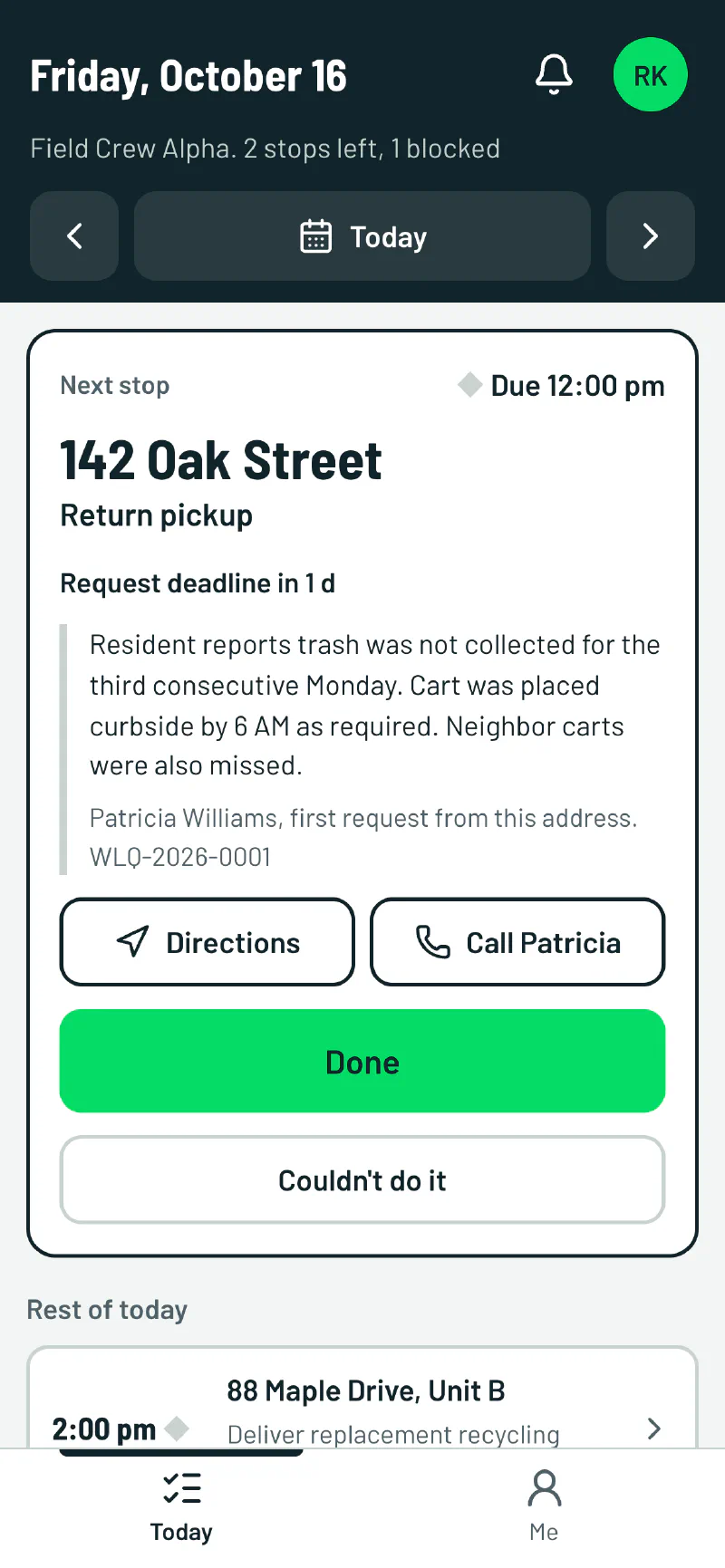
Field operations plan each day on a task board. Crews work it from My day on their phones.
- Tasks on a board: planned, to do, in progress, blocked and done
- Next stop, deadline, directions and a call button on the phone
- Done offers to resolve the request with a short note
- Couldn't do it asks why (blocked access, cart not out, needs a different truck) and tells the office
The program overview and reports
Directors land on one page that answers how the program is doing, and where it is not.
- On-time share, time to resolve and open escalations over 7, 30 or 90 days
- Each hauler's open work, on-time share, time to resolve and rating
- Reports by type, source and service area, counted in your time zone

Roles and settings
Eight roles, each with view, edit or manage access to each part of the product, tailored to your program.
- New people get a one-time invitation link to set their password
- Set the time zone, default priority and which request types the call center can log
- A log of every settings change and every change to someone's role or access
The officeOpens on Today
- Administrator
- Supervisor
- Call center agent
- Field ops manager
- Contractor manager
- Contractor
CrewsOpens on My day
- Field crew
LeadershipOpens on Overview
- Executive
See it with your own routes.
We will set WasteLogIQ up with your service areas, routes, haulers and SLA hours, and walk your supervisors through a week of requests.