Skip to content
WasteLogIQ home
Demo
Menu

From the first call to a cleared curb.

Service requests and field operations for city and county waste programs and their haulers. Every call becomes one record with a due time, followed through to the curb.

Missed pickup at 142 Oak Street Waste route RT-101, collected Mondays. High priority, called in by phone.
  1. Tue 8:12 am Called in The agent finds the address, sees its route and history, and logs it as high priority.
  2. 8:14 am Triaged It tops the queue with 48 hours on the clock, set by the High SLA policy.
  3. 8:20 am Assigned Dispatch sends it to Field Crew Alpha.
  4. 10:05 am In progress It shows up in the crew's My day as the next stop.
  5. 1:47 pm Resolved Collected on a return pass. The crew's note goes on the record.
  6. Thu 8:12 am SLA due Resolved with 42 hours 25 minutes to spare.

Built around the calls your agents already take.

Pick the type, set the priority, write one line. The request lands in the queue with its route, its area and a due time.

  • Missed pickup
  • Cart replacement
  • Damaged cart
  • Cart delivery
  • Bulk pickup
  • Service issue
  • Cart repair
  • Contamination complaint
  • Illegal dumping
  • Special handling
  • Route exception
  • Contractor issue

Numbered types are one key away in intake.

Out of the box

Request types
12
Ways requests come in
5
Priority tiers with SLA hours
4
Kinds of alerts
6
Automatic escalation rules
3
Roles with their own access
8

One queue. Then the right crew, on the clock.

Every open request in one place, handed to the people who will do the work. The clock starts when the call comes in.

  • Triage in one pass

    Filter by status, priority, route or area, then act on a whole batch.

  • Crews or contractors

    Assign in-house or to a hauler. Reassignments stay on the record.

  • SLA by priority

    Every request gets a due time. At risk and late rise to the top.

  • Escalate, keep the thread

    Flag it with a reason. Status and history stay intact.

  • Every step on record

    Who did what, and when, from the signed-in account.

  • Reports for the review

    Type, source, area, hauler performance and on-time share.

Everything on the platform

The IQ in WasteLogIQ

It knows your program, so your people don't have to remember.

WasteLogIQ carries your addresses, your SLA clock and your haulers' record, and acts on them as the work comes in.

  • 142 Oak Street

    • Route RT-101, waste, Mondays
    • Area North District
    • Hauler Metro Waste Services

    1 request already open here. Add a note instead?

    It knows the address

    Look up an address and its route, collection day, area and hauler are already there, and the request carries them. If something is open there, intake offers a note instead of a duplicate.

    • Logged: due time set by the SLA policy
    • Warning: a quarter of the time left, or 2 hours
    • Due: breached requests are escalated

    It knows the clock

    Every request is timed from the moment it is logged. People are warned before it is late, and rules escalate what slips without anyone watching the queue.

  • Needs your attention

    • Repeat addresses2
    • Complaints about haulers1
    • Lowest contract rating: Summit Hauling Co.78

    It spots the patterns

    The program overview calls out repeat addresses, complaints about haulers and the hauler with the lowest rating, before anyone asks for a report.

One record. A view for everyone who touches it.

Each job gets a screen built for it, all working from the same request.

One record

Missed trash pickup, 3rd week in a row

WLQ-2026-0001. 142 Oak Street.

RT-101 North District High

Every step on its history

Call center logs it In intake, while the resident is on the line
Dispatch assigns it From the queue, to a crew or a hauler
Field crew works it From My day, at the curb
Hauler posts updates Notes and field updates, on the same record
Leadership reviews it In the program overview and reports

Call center

Intake that keeps up with the caller.

  • Find the resident by address, phone or name
  • See their route and anything already open
  • Due time shown before you save
The intake screen with a caller's address open: their route and collection day, one open request, and the form to log a new one.

Dispatch

A queue sorted by time left.

  • Hours left on every SLA, at a glance
  • Saved views: due today, unassigned, escalated
  • Assign, update or escalate a batch at once
The request queue: open requests sorted by time left, with route, priority, assignee and status, and filters across the top.

Field crew

The day's stops, one at a time.

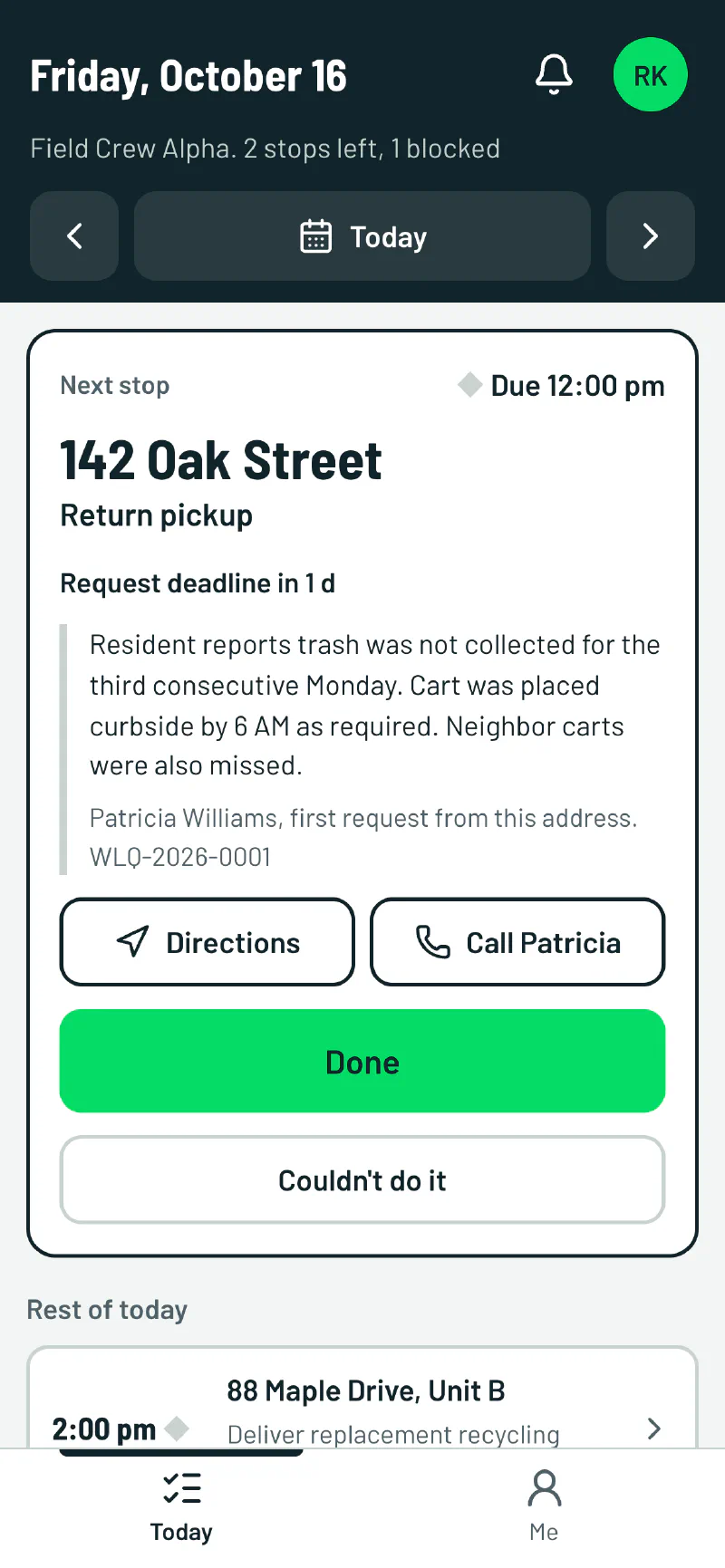
  • Next stop, deadline and directions
  • Call the resident with one tap
  • Couldn't do it sends the reason to the office
The crew's phone screen: the next stop at 142 Oak Street with its deadline, the resident's report, and Done and Couldn't do it buttons.

Leadership

The program, on one page.

  • On-time share and time to resolve
  • Each hauler's on-time share and rating
  • What needs attention, called out
The program overview: on-time share, requests received, time to resolve, open escalations, a trend chart and a hauler performance table.

Bring your routes. We will bring the rest.

We will show you WasteLogIQ set up with your own service areas, routes and SLA hours.